
Apni Chhat Apna Ghar Application Status Check by CNIC
| Programme | Apni Chhat Apna Ghar (ACAG), Government of Punjab |
| Official Portal | acag.punjab.gov.pk |
| Status Check Method | Login with CNIC and password, then open Application Status |
| Helpline | 0800-09100 (toll free) |
| Last Checked | 11 November 2026 |
The Apni Chhat Apna Ghar application status check is done on the official ACAG portal, and it is the only safe way to see where your housing loan case stands. Lakhs of families in Punjab have applied for this interest free loan, and most of them have one simple question: has my application moved forward or not? The answer is sitting inside your own portal account. There is no separate public page where a CNIC number alone shows your status, and there is no SMS code for this scheme. In this guide you will learn the exact login steps, what every status message on the portal means, what to do if you forgot your password, and which steps to take if your case is approved, stuck or rejected.
Key Takeaways
- Status is checked only by logging in at acag.punjab.gov.pk with your CNIC, password and the CAPTCHA shown on screen. There is no CNIC only page and no SMS code.
- The Application Status page shows your Application ID, your current status, the Selected MFI (your loan partner) and your loan category.
- If you forgot your password, the Forgot Password option sends an OTP to your registered mobile number and email. The code expires in 30 minutes.
- Checking your status is fully free. Never pay any agent and never share your OTP or password with anyone. For help, call the toll free helpline 0800-09100.
What You Need Before You Check Your Status
Keep these things ready before you open the portal, so the login does not fail halfway:
- The CNIC of the person who applied. Status is linked to the applicant’s own CNIC, not to any family member.
- The password you created at the time of registration on the portal.
- Your registered mobile number and email, because the portal can send a one time PIN (OTP) there during login.
- Your Application ID, if you saved it from the confirmation SMS. It is not needed for login, but it is useful when you talk to the helpline.
How to Check Apni Chhat Apna Ghar Application Status Online
Follow these steps on your mobile phone or computer:
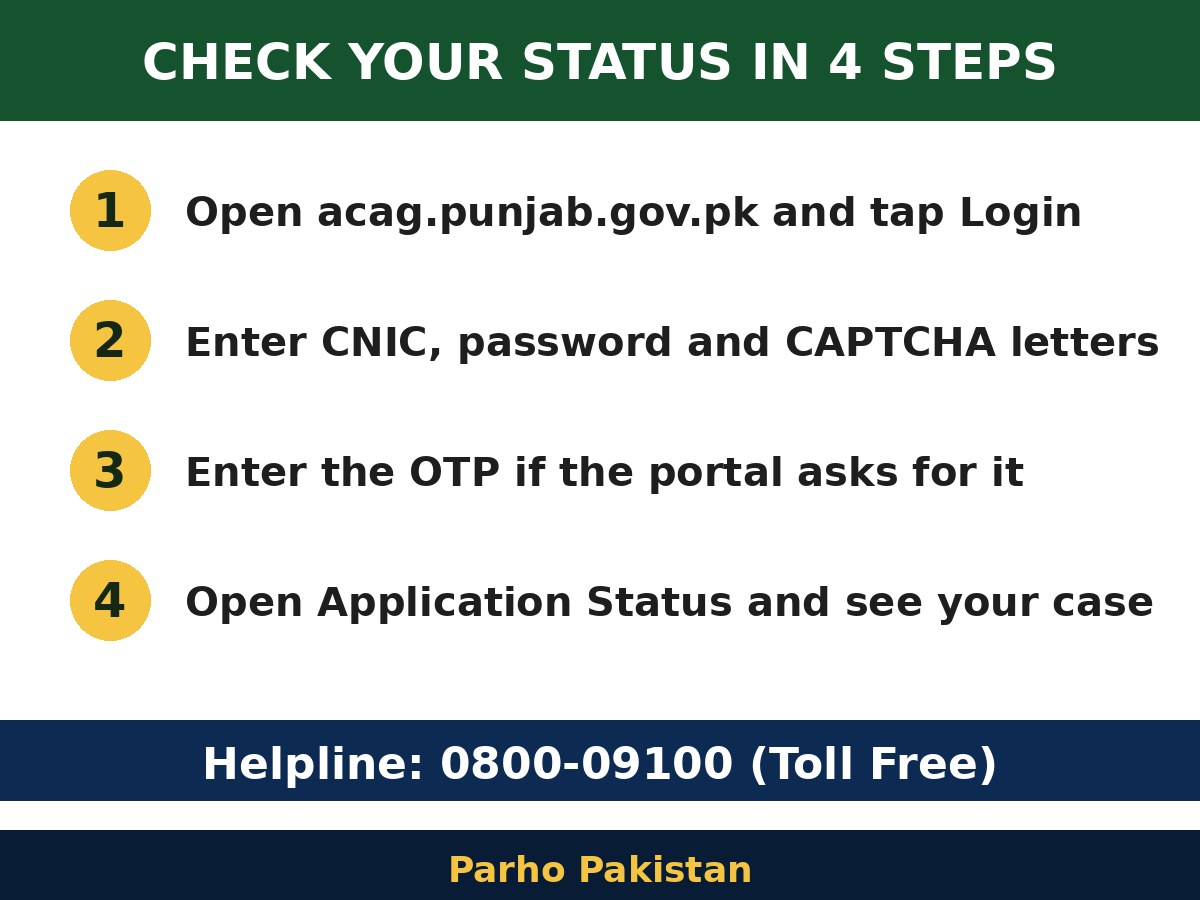
- Open the official portal acag.punjab.gov.pk and tap Login. You can also open the login page directly at acag.punjab.gov.pk/Login.aspx.
- Enter your 13 digit CNIC number, your password and the CAPTCHA letters exactly as shown. The CAPTCHA is case sensitive, so copy capital and small letters carefully.
- If the portal asks for a one time PIN, enter the OTP sent to your registered mobile number and email.
- After login, open Application Status. Your Application ID, name, CNIC, current status, Selected MFI and loan category will appear on the screen.
Remember one thing: you do not need to apply again just to check your status. Submitting a second application creates confusion and can delay your original case.
What Each Status Message Means
The status line inside your account changes as your case moves from one stage to the next. Here is what the common messages mean and what you should do at each stage:
| What You See | What It Means | What To Do |
|---|---|---|
| “Record has been Submitted Successfully. A SMS is sent on your registered cell number” | Your application has reached the system safely. | Keep the SMS safe and note down your Application ID. |
| “Your registration information has been sent to the relevant department for verification” | Your registration is waiting for verification by the department. | Wait for the SMS or email. If nothing arrives, visit an e-Khidmat Markaz with your CNIC or call 0800-09100. |
| Pending, under review or verification status | Your documents and record are being checked against the scheme rules. | Wait patiently and check your account about once a week. |
| Approved status with a name under Selected MFI | Your case has been sent to a loan partner for the next steps. | Deal only with that named organisation and follow its instructions. |
| Request for 2nd Tranche Release button | You can now request the next part of your loan. | Confirm your construction stage and upload the two photos the portal asks for. |
| Rejected status | Your application did not meet one of the scheme rules. | Read the rejection section below and call the helpline for the exact reason. |
If You See “No Data Found against this CNIC”
This message means the portal found no submitted application against the CNIC you used to log in. It usually happens for one of these reasons:
- A different CNIC was used. Maybe your brother, father or wife applied. Log in with the CNIC of the person whose name is on the application.
- The form was never submitted. If you filled the form but did not press the final Submit button, nothing was sent, and you would not have received the confirmation SMS. Log in, complete the form and submit it properly.
- An office applied for you. Applications are also taken at Deputy Commissioner, Assistant Commissioner and PHATA offices. Go back to that same office with your CNIC and ask for your Application ID.
If none of these reasons fits your case, call the toll free helpline 0800-09100 and ask the team to search your application by CNIC.
Forgot Password and Common Login Problems
Forgot password: On the login page, tap Forgot Password, enter your CNIC and tap Get OTP. A code is sent to your registered mobile number and email. Enter the code and set a new password. The code expires in 30 minutes, so finish the process in one sitting.
CAPTCHA error: Type the letters exactly as shown, with capitals where they appear. If the letters are hard to read, reload the CAPTCHA and try again.
OTP not arriving: The code only goes to the mobile number and email saved in your account. If that number is closed or changed, the code cannot reach you. In that case, call 0800-09100 for help.
Portal loading slowly: The portal gets heavy traffic in office hours. Try early in the morning or late at night, when the rush is low.
If Your Application Is Approved, What Happens Next?
After approval, your case goes to the loan partner shown in the Selected MFI line of your status page. The portal works with four partners: Akhuwat, the Bank of Punjab, the National Rural Support Programme (NRSP) and the Rural Community Development Programme (RCDP). The partner staff verify your plot and documents, complete the loan paperwork and then release the money.
The loan is up to Rs 1.5 million, fully interest free, and it is paid in tranches (parts), not in one payment. You repay it in monthly instalments over 7 years. When your house construction reaches the required stage, the status page shows a Request for 2nd Tranche Release button. You confirm the construction stage and upload two photos, a front view of the property and one photo of the current construction progress, in JPG or PNG format up to 1 MB each.
One honest warning: approval does not always mean the money arrives in a few days. In an August 2026 news report from Vehari, some approved families said they had waited months for the first tranche. So keep visiting your loan partner, keep every receipt and paper, and keep checking your status page until the first payment reaches you.
If Your Application Is Rejected
A rejection normally means one of the official rules was not met. Your application is checked against these rules: you must be a Punjab resident aged 21 to 60, registered in the NSER or PSER survey with a PMT score of 60 or less, the sole owner of a plot up to 5 marla in a city or 10 marla in a village, with no criminal record and no unpaid bank loan. If any one of these fails, the application is rejected.
- First, open your account and read any remarks written with your status.
- Call the toll free helpline 0800-09100 with your CNIC and Application ID, and ask which exact rule caused the rejection.
- If the problem is a record you can correct, such as an old household survey, correct it first and then ask the helpline if you can apply again.
- If you believe the decision is wrong and you get no clear answer, register a complaint on the Pakistan Citizen Portal.
Mehfooz Chhat Applicants Check Status the Same Way
The same portal also runs Apni Chhat Mehfooz Chhat, the interest free loan for families who already have a house. It gives up to Rs 500,000 for roof repair or an added room, and up to Rs 1,000,000 for an extra floor. If you applied under Mehfooz Chhat, you check your status in exactly the same way: log in at acag.punjab.gov.pk and open Application Status. There is no separate website for it.
New Applications: What Is the Latest Update?
Many readers ask whether new applications have opened. In October 2026, the Punjab Cabinet approved Rs 60 billion for 40,000 more Apni Chhat Apna Ghar loans through the Bank of Punjab, and on 3 November 2026 the Chief Minister approved inviting new applications. However, the portal has not announced any opening date for new applications so far. If you already applied, keep checking your status as explained above. And do not pay any person who claims he can get your new application registered before the official opening.
Stay Safe: Free Check, No Agents, No SMS Code
- Use only the official website acag.punjab.gov.pk and always check the address bar before typing your CNIC or password. Many fake websites copy this scheme’s name to steal data.
- The official portal lists no SMS code for status check. Some websites wrongly tell people to send their CNIC to 8171. That code belongs to BISP, not to this housing scheme.
- Nobody can get your loan approved or released in exchange for money. Any such demand is fraud.
- Never share your OTP or password with anyone, even if the person claims to be from PHATA, a bank or a loan partner.
- For official help, call the toll free helpline 0800-09100, PHATA at 042-99213419 or 042-99213428, or email [email protected].
Related Guides on Parho Pakistan
- CM Punjab Apni Chhat Apna Ghar Loan Scheme: Apply Online Guide
- Affordable Building Materials Guide for Apni Chhat Apna Ghar Applicants
- BISP 8171 Web Portal: Check CNIC Eligibility Online
Frequently Asked Questions
How do I check my Apni Chhat Apna Ghar application status by CNIC?
Open acag.punjab.gov.pk and tap Login. Enter your 13 digit CNIC, your password and the CAPTCHA letters, then tap Login. If an OTP is asked, enter the code sent to your registered mobile number. Now open Application Status to see your Application ID, status, loan partner and loan category.
Can I check my ACAG status by SMS or without a password?
No. The official portal has no SMS code for status check and no public page that shows status with CNIC alone. Some websites wrongly give the 8171 code, but that code belongs to BISP. Use your portal login, or call the toll free helpline 0800-09100 and ask for your status.
What does “No Data Found against this CNIC” mean on the portal?
It means the portal found no submitted application against the CNIC you used to log in. Check that you logged in with the applicant’s own CNIC and that the form was fully submitted, which sends a confirmation SMS. If an office applied for you, ask that office for your Application ID.
I forgot my ACAG portal password. What should I do?
Tap Forgot Password on the login page, enter your CNIC and tap Get OTP. A code is sent to your registered mobile number and email. Enter the code and set a new password. Remember that the code expires in 30 minutes, so complete the process in one sitting without delay.
My application status is approved. When will I receive the loan?
After approval, your case goes to the loan partner shown as Selected MFI, such as Akhuwat, Bank of Punjab, NRSP or RCDP. The partner verifies your plot and documents, and the loan is paid in tranches, not at once. Some approved families have waited months, so keep following up regularly.
For more scheme updates and guides, keep visiting Parho Pakistan.
For More Jobs Follow Whatsapp Channel: https://whatsapp.com/channel/0029VaCNJFk1XqugBkUbJS2A


